Pages & the UI designer
The UI designer lets you build full pages — dashboards, work queues, record views — by arranging widgets on a canvas. There is no frontend code: you pick widgets, point them at your app's data, and decide who sees what. Everything you configure is rendered on the server, so a widget's data and rules never reach a browser that shouldn't see them.
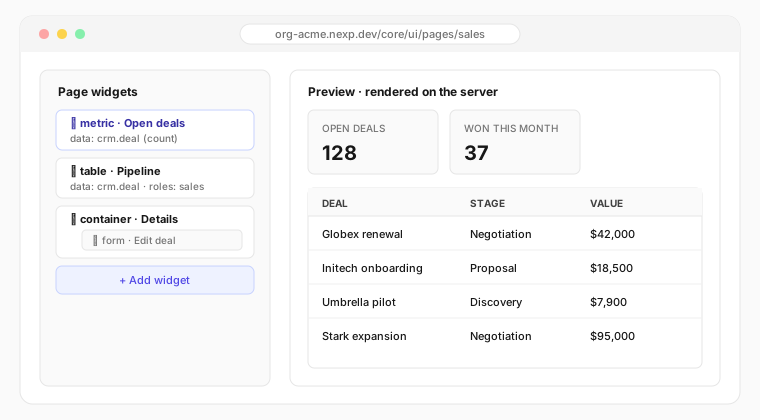
Working in the designer
- Open Pages → New page, choose the app it belongs to and a URL segment.
- Add widgets from the palette and arrange them on the grid.
- Select any widget to configure it inline — its data, appearance and access rules. Container widgets (sections, tabs) hold other widgets, so you can nest layouts without leaving the page.
- Save — the page is live immediately for everyone whose roles allow it.
Every change is captured into your active update set, so page work is versioned and promotable like everything else.
The widget palette
| Widget | What it does |
|---|---|
| Table | A full data grid over any of your app's tables — filtering, sorting, pagination, bulk actions and per-row actions |
| Metric | A single number (count, sum, average) over a table, with an optional comparison |
| Chart | Visual summaries driven by the same data bindings as tables |
| Form | Embed any form you've built — inline, or opened from a button |
| Container & Tabs | Group widgets into sections or tabbed views; each tab can have its own audience |
| Static content | Headings, text and rich content blocks |
| Custom widgets | Widgets published by installed apps appear in the palette automatically |
Binding data
Select a widget, pick the app and table it should read, and optionally add filters — for example "only rows where status is open", or "only rows owned by the signed-in user". Filters are part of the page configuration and run on the server, which means:
- Row- and column-level access rules always apply — a widget can never show more than the viewer is allowed to see.
- Nothing about the query is exposed to the browser.
Who sees what
Every widget (and every tab) accepts role requirements:
- Hide — users without the role never receive the widget at all.
- Notice — the widget's spot shows an access message instead.
This is enforced at render time on the server, and complements the data-level rules — hiding a widget is a courtesy; the data behind it is protected regardless.
Actions
Tables can carry row actions ("Edit", "Approve", "Mark won") and pages can carry page actions. An action either opens a form or runs a trusted server function — with a confirmation prompt if you want one. Actions respect roles the same way widgets do.
Example: a sales overview page
A typical page built in a few minutes:
- Two metrics across the top — "Open deals" and "Won this month".
- A table bound to the deals table, filtered to the viewer's own records, with row actions Edit (opens the deal form) and Mark won (runs a server function, with confirmation).
- A tab container below — an "Overview" tab for everyone, and a "Forecasts" tab visible only to sales managers.
Nobody wrote a line of frontend code, and a rep and a manager see genuinely different pages — decided on the server.
Building integrations or want the exact configuration keys? See the UI builder reference.