Environments
An environment is one copy of your organization running on a cluster. A licensed organization typically runs three: dev, staging and prod. Each environment is a full instance — own database, own realm — so changes in dev can never touch prod data.
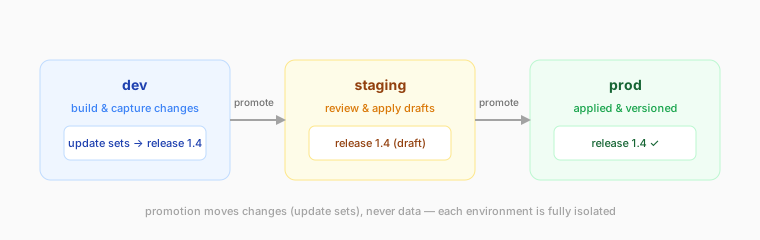
What an environment contains
Everything an instance has: the database (schema + data), identity realm, apps, pages, update sets and releases. Environments of the same organization share nothing at runtime; they are connected only by release promotion.
Creating a new environment
The free plan includes a single environment. On a licensed plan you can
add environments (e.g. a staging next to your prod):
- Open the console and find your organization's card.
- Pick the kind (
dev,stagingorprod) and choose Request environment. - The control plane places the environment on a cluster with capacity and provisions it — the new environment appears in your console with its own URL within a couple of minutes.
Self-serve environment creation requires an active license with available environment slots. When your plan's limit is reached, the request is declined — contact support to extend it.
Each new environment starts empty (schema and platform apps only). Populate it by promoting a release from an existing environment.
Custom domains
Every environment gets a platform address (org-<slug>.nexp.dev). On a
licensed plan you can also bind your own domain or subdomain to any
environment — point your customer-facing address (e.g. app.acme.com) at
prod while staging stays on its platform URL:
- Add a CNAME from your subdomain to your environment's platform address.
- Ask support to bind it (self-serve binding from the console is coming) — TLS certificates are issued automatically once the DNS resolves.
Environment lifecycle
Environments report activity to the control plane. Plans with an idle policy
(free) move through active → idle → paused automatically —
see Your free instance. Licensed
environments stay up; operators can pin or suspend them administratively.
Working across environments
The intended flow:
- Build in dev. Changes are captured into update sets as you work.
- Bundle completed work into a release.
- Promote the release to staging; the update sets are imported there as drafts, version-checked against the target's core version, reviewed, and applied.
- Promote the same release to prod.