Your free instance
Every nexp.dev account can create one free instance — a full nexp environment with its own database, identity realm and app space. No credit card.
Create it
- Sign in to the console.
- Enter your organization name — a short unique instance address is
generated automatically (e.g.
org-n3f9c2a1.nexp.dev); the name itself is display-only. - Click Create free instance. Provisioning usually takes about a minute; the console shows the state live.
Your admin credentials
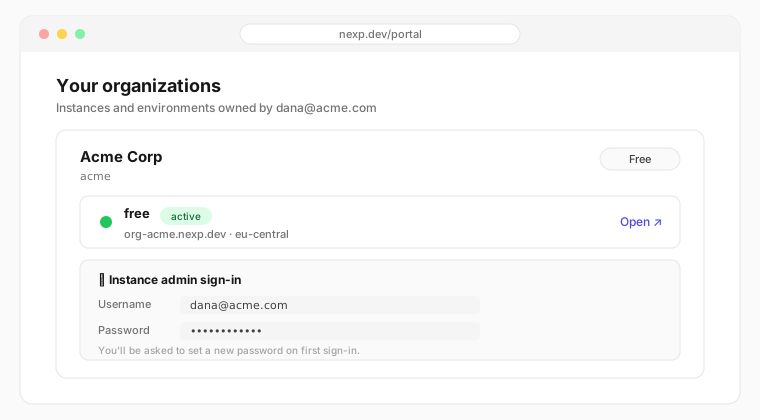
Once the instance is up, the console shows the instance admin sign-in:
- Username — your account email.
- Password — a generated one-time password. You'll be required to set a new password the first time you sign in to the instance.
These credentials belong to your instance's own realm, not to your nexp.dev account. Only free instances surface credentials in the console; licensed organizations are onboarded by our team.
The free-tier lifecycle
Free instances pause after 2 days of inactivity:
| State | Meaning |
|---|---|
| active | Running and reachable |
| idle | No activity for a day — still reachable |
| paused (suspended) | Two days without activity — sign-ins are blocked |
A paused instance keeps all of its data. Press Reactivate in the console and it's back within a minute. Instances left paused for a long time are eventually archived (a backup is taken first).
Limits
- One free instance per account.
- One environment (no staging/prod) — see Environments for what paid plans add.
- Fair-use compute/storage on the shared free cluster.